
Installation
Server requirements
- PHP >= 7.4.0
- OpenSSL PHP Extension
- PDO PHP Extension
- Mbstring PHP Extension
- Tokenizer PHP Extension
- XML PHP Extension
- Ctype PHP Extension
- JSON PHP Extension
- ZIP PHP Extension
- BCMath PHP Extension
How to install
How to install in root directory-
- Download the zipped file from CodeCanyon.
- Upload the zipped file into cPanel / server.
- Unzip the zipped file. Inside the unzipped folder you will get two folders "Documentation" and "upload"
- Move all the items from the "upload" folder to the root directory.
-
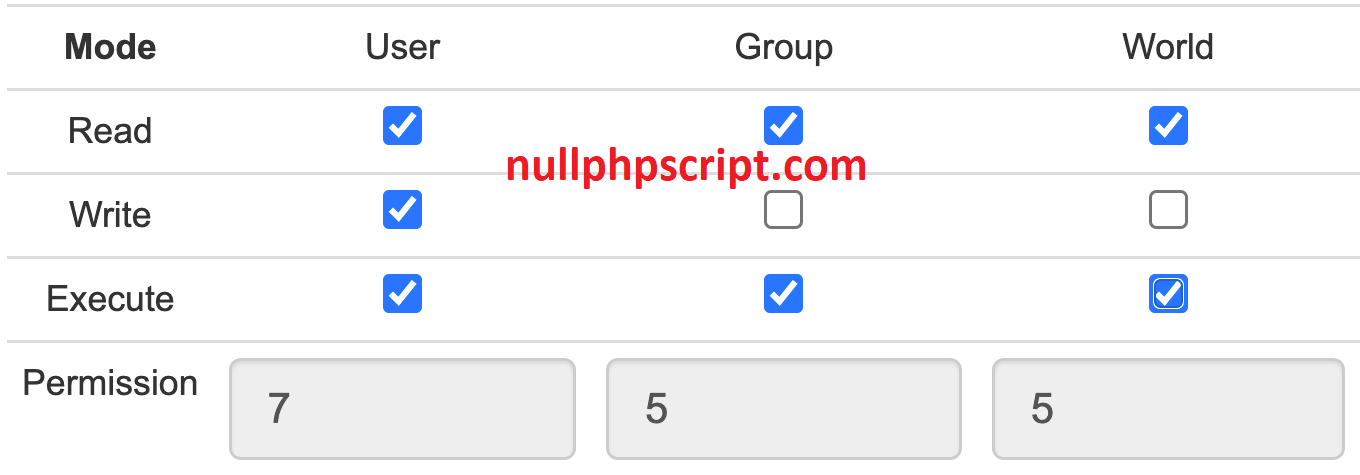
Make sure you have correct access permission for these directory
- 'storage/framework/' => '755'
- 'storage/logs/' => '755'
- 'bootstrap/cache/' => '755'
- 'config/' => '755'
- Go to URL your_domain/install/. or your_domain/install. Follow the easy installer procedures step by step and install the application.
-
Create the database and remember these things for future usage.
- database name
- username
- password
-
After completing the installation, you need to configure Email (in App settings) and Cron job (in Server control panel/cPanel) by following "Important settings".
N.B: Make sure that your email delivery service credentials are correct. Otherwise, you will get this type of message alert "Configure email setup properly / Server error / Something went wrong". .
How to install in subfolder-
- Download the zipped file from CodeCanyon.
- Upload the zipped file into cPanel / server.
- Unzip the zipped file. Inside the unzipped folder you will get two folders "Documentation" and "upload"
- Move all the items from the "upload" folder to /public_html/sub_folder directory.
-
Make sure you have correct access permission for these directory
- 'storage/framework/' => '755'
- 'storage/logs/' => '755'
- 'bootstrap/cache/' => '755'
- 'config/' => '755'
- Go to URL your_domain/install/. or your_domain/install. Follow the easy installer procedures step by step and install the application.
-
Create the database and remember these things for future usage.
- database name
- username
- password
-
After completing the installation, you need to configure Email (in App settings) and Cron job (in Server control panel/cPanel) by following "Important settings".
N.B: Make sure that your email delivery service credentials are correct. Otherwise, you will get this type of message alert "Configure email setup properly / Server error / Something went wrong". .